If your Brother laser printer is asking you to replace the drum, a new toner cartridge will not fix it. These are two different parts, they wear out at different rates, and confusing them is the single most common reason a Brother laser owner buys the wrong thing.
Two parts, not one
| Toner cartridge (TN…) | Drum unit (DR…) | |
|---|---|---|
| What it is | The powder that makes the marks | The green roller that carries the image onto the paper |
| How long | Roughly 1,000–3,000 pages depending on the model | Roughly 12,000 pages — several toners |
| What you see | Faded print, “Replace Toner”, “Toner Low” | Repeating marks or bands down the page, “Replace Drum”, “Drum End Soon” |
| Typical cost | Lower, bought often | Higher, bought rarely |
On most Brother mono lasers the two clip together into one assembly, which is exactly why people think they are one part. Take the assembly out and there is a small lever — usually green — that releases the toner cartridge from the drum.
How to tell which one you need
Read the message, not the symptom.
- “Toner Low” / “Replace Toner” → you need a TN cartridge
- “Drum End Soon” / “Replace Drum” → you need a DR drum unit. The toner is probably fine.
- The same mark in the same place on every page, roughly every 94 mm → drum
- Print gets pale from one side, or pale overall → toner
Before you buy a drum: take the drum and toner assembly out, hold it level and rock it gently side to side a few times, then put it back. That redistributes the toner and clears a surprising number of “faded print” complaints for nothing.
“Replace Drum” when you have just fitted a new drum
The printer does not measure the drum. It counts pages, and the counter has to be reset by hand after you fit a new one. If you skip the reset, the printer keeps saying “Replace Drum” forever.
On most Brother mono models: open the front cover, leave the drum assembly in, press OK or hold Go for about four seconds until the Drum light goes out, then close the cover. The exact sequence differs by model — if yours does not respond to that, call us and we will look up your model.
Which parts fit which printer
Brother pairs a TN with a DR in families. Two of the most common in New Zealand:
- HL-L2310D, HL-L2375DW, MFC-L2713DW, MFC-L2770DW, MFC-L2775DW → toner TN-2445, drum DR-2425
- HL-1110, HL-1210W, DCP-1510, DCP-1610W, MFC-1810, MFC-1910W → toner TN-1070, drum DR-1070
The model number is on the label on the back or underneath the printer — not the serial number.
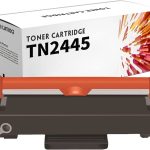
Does a compatible toner shorten the drum’s life?
This comes up constantly and the honest answer is: a badly made one can. Toner particle size and charge characteristics vary between manufacturers, and coarse powder is harder on the drum surface. That is an argument for buying decent compatible toner, not for paying genuine prices — but it is a real difference, and anyone telling you all compatibles are identical is selling you something.
What we can tell you is what we do: we buy on tested batches, not on price alone, and we replace anything that causes print defects within 12 months.
Not sure?
Call 0800 INKINK with the printer model and the exact wording on the display. That combination is almost always enough for us to tell you whether it is toner, drum, or neither.